Moving from Libsyn to Captivate (Without Breaking Your Podcast)
This content may contain affiliate links, meaning I earn a small commission if you purchase through these links at no additional cost to you. I only recommend products or services I trust and believe will provide value to you. Thank you for your support!
If you're thinking about moving from Libsyn to Captivate, take a breath.
This is not complicated. It is just precise.
I’ve helped podcasters move hosts for years, and the biggest problems don’t come from the technology — they come from people rushing. So follow these steps in order and you’ll migrate your podcast from Libsyn to Captivate without losing subscribers, reviews, or your sanity. Do not multitask while doing this. Give it your full attention.
- Do NOT delete your Libsyn account
- Do NOT change your show title or artwork during the move
- Do NOT redirect your RSS feed until Captivate is fully ready
Your RSS feed is your show. Treat it like a live wire.
Step 1: Locate Your Libsyn RSS Feed
Log into Libsyn and go to:
- Settings (gear in the upper right hand corner)
- Destinations > Apple Podcasts / Libsyn Classic Feed > Edit
- Copy your RSS Feed URL
It will look something like:
https://yourshow.libsyn.com/rss

Step 2: Import Your Podcast Into Captivate
Now we begin moving from Libsyn to Captivate officially.
- Log into Captivate
- Click on "My Podcasts" on the left and then click, "Add New Podcast"
- Select Switch your podcast to captivate (upper right)
- Paste your Libsyn RSS feed (your podcast information will display)
- Scroll down and click Next.
- It will show your new feed (that no human sees) click Submit.
(it takes a second to import). - Click the RSS feed link at the top of the Captivate Screen (the feed URL is copied)
Captivate will automatically pull in:
- Your episodes
- Your artwork
- Your show description
- Your episode titles and show notes
Let it finish completely. If you have a large back catalog, grab coffee.
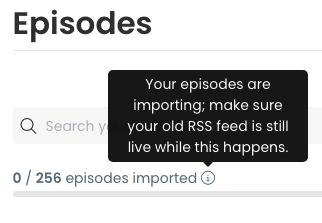
Step 3: Verify Everything (Do Not Skip This)
Before redirecting anything, confirm:
- Episode count matches Libsyn
- Artwork displays correctly
- Description is correct
- Email address is correct (captivate hides this for you - cool! Less spam)
- Website link is correct
Open two or three older episodes and make sure the audio plays.
This is your safety net.
Step 4: Redirect Your RSS Feed in Libsyn
This is the moment that completes moving from Libsyn to Captivate.
- Go back to Libsyn
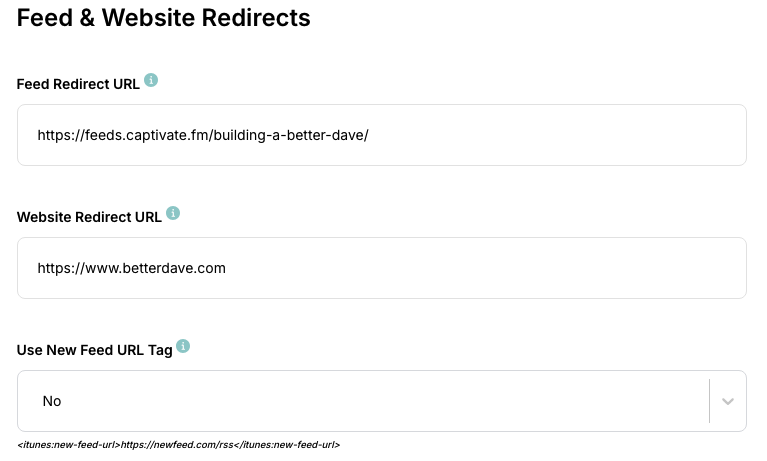
- Go to Settings > Advanced Tools > Feed & Website Redirects
- Click on Edit
- Paste your NEW Captivate RSS feed URL (from step 7 above) into the Feed Redirect URL.
- Paste your website address into the website URL.
- Click Save
This creates a 301 redirect. That tells every podcast app:
"Hey — the feed moved. Go here instead." Then moving forward the app goes to the Captivate feed.
Your listeners do not need to resubscribe.
Step 5: Test the Redirect
- Paste your OLD Libsyn RSS feed into a browser
- Confirm it forwards to your Captivate feed (look at the very top at the URL in your browser)
If it redirects correctly, you’re good.
Step 6: Wait Before Canceling Libsyn
Keep Libsyn active for at least 4 weeks.
Some podcast apps cache feeds slowly. Give the ecosystem time to update.
After that, you can safely cancel.
What Happens to Your Stats When Moving from Libsyn to Captivate?
If you're on the Advanced ($25) plan, you can export your stats, and import them into Captivate. (Tutorial). If you need help, Captivate's team is amazing.
What About Apple, Spotify and Apps?
Those apps should follow the redirect and update automatically. DO NOT re-submit your show to apps or you will end up listed twice. Give it 24 hours and go into the Apple and Spotify dashboards and make sure your new feed is listed (if it's not manually update it - but my guess is it has updated automatically).
With this in mind, I wouldn't do this the day before you release an episode.
Common Mistakes When Migrating from Libsyn to Captivate
- Deleting Libsyn before redirecting
- Changing show title mid-migration
- Publishing new episodes before verifying import
- Ignoring redirect testing
- Redirecting before importing into Captivate.
Need Help Moving from Libsyn to Captivate?
If you'd rather not do this alone, I help podcasters at the School of Podcasting migrate safely all the time. A small mistake can cause big headaches — but done correctly, this process is smooth and boring (which is exactly what we want).
Moving from Libsyn to Captivate doesn’t grow your audience. Better content does. But if you’re switching for features, support, or workflow — now you know how to do it safely.

I've been podcasting since April of 2005. My podcast about podcasting has been downloaded over 3.1 million times (as of 2022). I've helped hundreds of people launch podcasts. Before podcasting, I used my degree in education (specializing in technical education) to harness the power of hardware and software (going back to fax machines and this new thing called e-mail and the Internet).
To hear what my client say, please visit my testimonial page.
How Dave is Different
Unlike many other “geeks” who know how to podcast, I've been a technical trainer for over 20 years. This means not only do I understand the technology but I can explain it in a plain English “geek-speak free” environment. I have a Bachelor's Degree in Education from the University of Akron (Specializing in technical education). While there are other podcast consultants, I believe my experience sets me apart in regards to helping you make sense of the entire podcasting process. I not only help with the “how,” but I also help explain the why, and make sure you avoid the common podcasting pitfalls. I have won awards at fortune 500 companies for my customer service. In a nutshell, I care.
I am one of the top podcast consultants, and I have spoken at many marketing and media conventions including New Media Expo, Blog World, Erma Bombeck Writing Workshops, Podcamp Columbus, Podcamp Cleveland, Podcamp Cincinnati, and the Business of Writing Summit. I am the author of the book Profit From Your Podcast.
In 2014 I was named the Director of Podcasting for t…Read More
The Never Ending List of Podcasts About Podcasting